Lucky Wave Casino Login Process and Account Verification Requirements
The registration form opens up 10,000+ titles from 116 studios, the Million Drops Tournament, crypto payments and a welcome pack of up to £15,000 + 300 free spins. After that, the Lucky Wave Casino login procedure is just two fields.
But the Cashier is stricter than the sign-up page. The casino can hold a withdrawal until your ID has been checked, and the cap is £3,000 a week. This guide covers verification and Luckywave login troubleshooting using the T&Cs and FAQ, so your first cashout doesn’t feel as a twist.
Account Setup at Luckywave Casino
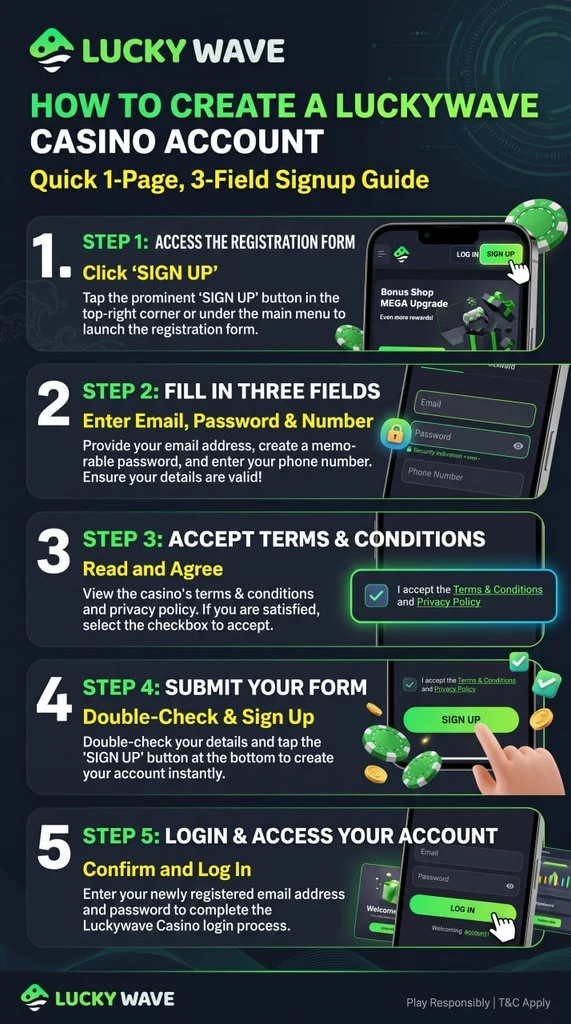
The registration form has 3 fields for email, password and phone number. It doesn’t ask for your name, date of birth or address. Those come later, with your documents. The 3 profile steps are:
- Press “SIGN UP” in the right corner of the homepage.
- Fill in your email address, password and phone number. Pick an email you can access and a password you’ll remember, because these are your Lucky Wave login details.
- Tick the box confirming you are 18 and accept the Terms and Conditions and Privacy Policy. Sections 8 (account use) and 11 (withdrawals) of the T&Cs are the ones worth reading first.
- Check the details and press “SIGN UP”.
- Use the same email and password for your first Luckywave Casino login.
To claim the first deposit bonus of up to £2,000 + 150 FS, use code 1LW. The T&Cs set the min deposit at £20, and the wagering terms are tied to the most deals.
Registration Eligibility Requirements
Casino Lucky Wave sets the minimum age at 18 and asks you to confirm it at sign-up. On the Responsible Gaming page you can find that the site can request proof of identity and will deny access to anyone underage. Each person may have one account only. Duplicates can lead to termination and suspended payouts, and the account can’t be shared with others, including family members. By playing, you also confirm you aren’t using a VPN. Register with details that match your documents exactly. If the paperwork and reality don’t line up, the casino can close the profile and confiscate the balance.
Account Verification Procedures
This process takes up to 48 hours. Start in the “Verification” tab of your profile and upload 2 documents:
- for identity – passport, driving licence or national ID card)
- for address – utility bill, mortgage statement or tenancy agreement)
Docs must be in Latin or Cyrillic, otherwise the site can ask for a video verification. Do it straight after registering. The casino can hold any withdrawal until your identity is checked, may ask for proof of funds and can re-check a document later. Deposits must come from a payment method in your own name.
Lucky Wave Login Process
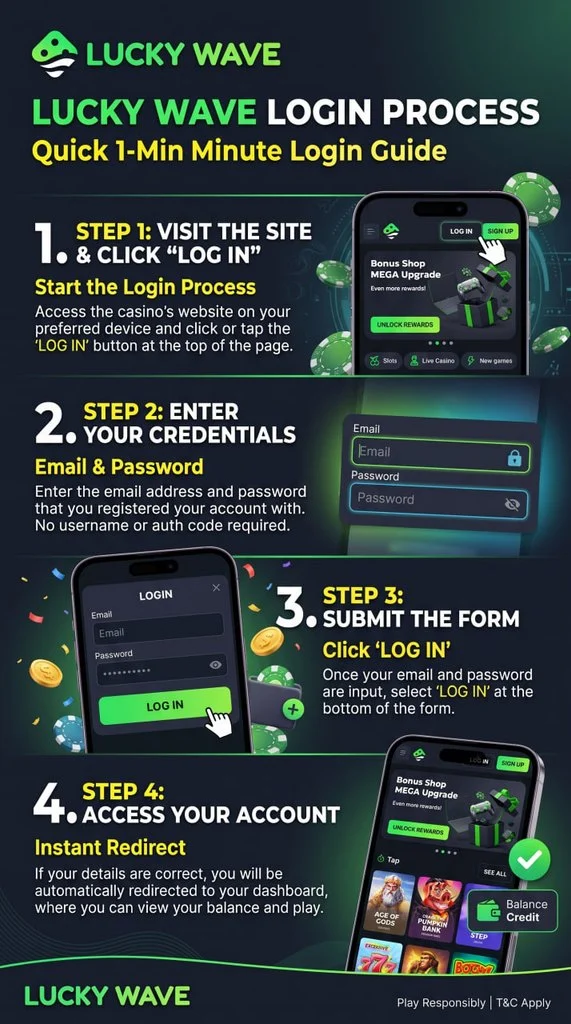
The sign-in form has only 2 fields for email and password. To continue spinning slots or withdraw the winnings enter the profile menu:
- Press “LOG IN” in the header.
- Enter the email address and password from your Luckywave registration form.
- Press the “LOG IN” button at the bottom of the form.
If you don’t have an account yet, the form has a “Sign up” link at the bottom. The casino Lucky Wave login screen also has a “Need help?” link under the password field.
Mobile App Login Procedures
The menu has a “Download App” button, with PWA versions for iOS and Android. Sign-in on a phone or tablet works just with email and password. Luckywave lets you take titles, such as Lucky Wave Bonanza, on the go. Once logged in, the menu gives you Bonuses, Tournaments and the VIP Club.
Data Security and Personal Information Protection
Lucky Wave operates under an international licence, not a UK Gambling Commission one. So the T&Cs are not UKGC rules but set out what the casino can and can’t do with your account. Here are some of the main points:
- Duplicate accounts. If the casino detects overlapping IP addresses between two or more accounts, it can confiscate funds or suspend access.
- Document checks. False or unclear documents mean account closure and confiscated funds.
- Games. The FAQ says every game carries a Random Number Generation certificate.
How your personal data is handled is covered in the Privacy Policy.
Common Login Issues and Resolution Strategies
Most sign-in problems come down to a typo, a forgotten password or an email that didn’t come. Here are the fixes:
- Password Recovery. You can get a new password immediately on the forgot password page. If that fails, “Need help?” on the login form is the other option.
- Missing Confirmation Email. Check your spam folder and the address you typed at sign-up. If nothing arrives, press “Need help?” and follow the steps.
- Absent Guidance. Support runs 24/7 via live chat or by email support[at]luckywave.com.
Account Deletion Rules
Casino Luckywave handles closures via support, by live chat or email. Tell the team you want to close the account, and they will process it. But withdraw all winnings first.
Taking a break is a good idea, but notify the support first. The casino counts an account as dormant after 90 days without a deposit, bet or withdrawal, and can then close it and keep the balance. If time away is about keeping gambling under control, the casino’s Responsible Gaming page lists GamCare, Gamblers Anonymous and Gambling Therapy.